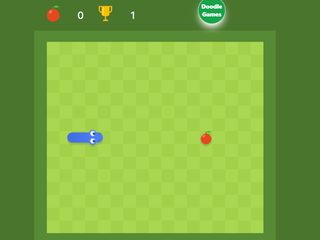
The classic snake game from Google Search: guide your snake around
the field, eat apples to grow longer, and don't run into the walls
or your own tail.
How to play
- Steer with the arrow keys on a keyboard, or swipe on a phone.
- Each apple makes the snake longer and adds to your score.
- The longer you get, the less room you have, so plan your turns.
Controls
- Computer: arrow keys or W, A, S, D to turn.
- Space, Enter or R starts a new game from the menu. M mutes the sound.
- Phone or tablet: swipe up, down, left or right on the field.
Modes, fruit and fields
Press the gear on the menu to change the game. There are 16
modes. The trophy is the classic snake. Each other mode adds a
twist, for example walls, portals, fruit with wings, keys and
locks, boxes to push, poison fruit, hidden mines and statues.
You can also pick from 22 food choices, from apples and bananas to
mushrooms and peanuts, play with 1, 3 or 5 fruit on the field,
choose a normal, fast (rabbit) or slow (turtle) snake, a small,
normal or large field, 19 snake colours and 9 field themes, from
a sunny meadow to night, snow, a volcano, desert and space. The
dice button shuffles the settings.
Tips
- Hug the walls: run along the edge, then turn in, so your tail stays in one tidy block.
- Never turn into a pocket that is shorter than your tail.
- Learn on the slow snake with 5 fruit, then try fast with 1.
FAQ
Is Google Snake free?
Yes. It runs in your browser, with no download or sign-up.
Can I play Google Snake on my phone?
Yes. Swipe on the field to turn the snake.
Where is my score?
After each game the menu shows your score next to the fruit and your best next to the trophy.
More classics: PAC-MAN,
2048 and all
Google Doodle games.